
AI Sysadmin Launcher
One key, one sentence, done. The launcher hands your request to a command-line AI agent that carries it out on your machine — and shows you what it is doing while it does it.
What it does
AI Sysadmin Launcher sits in the system tray and opens a small, frameless window on top of everything else when you press a global hotkey (Scroll Lock by default). You type what should happen — “install Docker”, “why won’t this service start”, “clean up /var/log” — and press Escape to put it away again.
The work is not done by the launcher but by a command-line agent of your choosing: Claude Code, ChatGPT Codex or opencode. The launcher spawns it as a child process, passes your text as an argument — never as an assembled shell command — and streams the output back into the window as it arrives. The conversation stays continuous: the agent’s own session id is carried forward, so the next question builds on the last.
For anything needing elevated rights, nobody types a password into a chat box. On Linux this goes through sudo -A and your desktop’s graphical password dialog, on Windows through the usual UAC prompt. Neither the launcher nor the agent sees the password.
The backend, the hotkey, the paths to the CLI programs and the system prompt are all editable in the settings window and stored as one JSON file in the configuration directory. The Windows and Debian/Ubuntu installers can set up autostart, so the tray icon is already there after you log in.
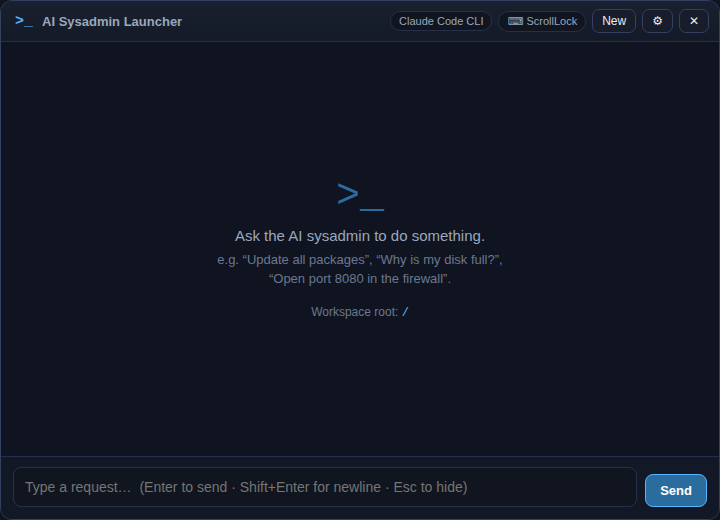
The window at rest: the chosen AI backend and the key that summons it along the top, three example requests in the middle, the input line at the bottom.
What you get out of it
- One global hotkey instead of finding a terminal, recalling a command, looking up flags.
- Three agents to pick from — stay with the one you already pay for.
- Output streams live: you watch what is being run, not just the result.
- A continuous conversation, without resending the transcript each turn.
- Passwords go through the system dialog (Linux) or UAC (Windows), never the chat box.
- Windows and Linux from one source, with ready-made installers.
What people use it for
The service will not start
Paste the error and ask. The agent reads the journal itself instead of handing you commands to retype.
A new machine
Describe the usual list of packages and settings as one paragraph rather than working through it line by line.
Rarely used operations
Growing a partition, adding a firewall rule, repairing permissions — the things whose syntax you look up every single time.
Requirements
- PlatformWindows, Linux
- RuntimeElectron (keine Node-Installation nötig)
- CategoryOS Tools