
Daily Schedule
Not another task list. A daily routine that knows what is due now, and says so.
What it does
Daily Schedule manages neither projects nor deadlines but the shape of a day: the things you meant to do every morning, every afternoon, every evening and that slip anyway.
Entries sit with their times in a local SQLite file. The program stays quietly in the background and speaks up at the right moment through the tray icon — not a flood of notifications, just the next step.
The interface is JavaFX and runs on Windows and Linux from the same package. There is no account, no server and no sync; the file is on your machine.
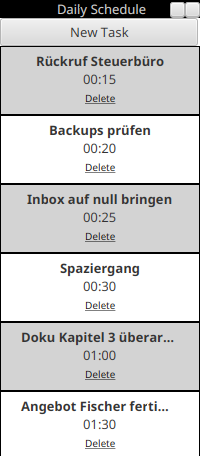
The narrow window that parks itself at the right edge of the screen and stays on top: the button for a new task at the top, then the tasks ordered by the time left, each with its duration and a link to delete it.
What you get out of it
- A recurring routine rather than a growing task list.
- A reminder at the right time through the tray icon.
- Data in a local SQLite file, with no account and no server.
- Runs on Windows and Linux from the same package.
- Small and quick to start.
- Unobtrusive: no window demanding the foreground.
What people use it for
Structure when working from home
Without an office day the shape blurs; a fixed plan helps more than a list.
Morning and evening routines
The same steps, in the order that has proved to work.
Medication and breaks
Anything that should happen at set times and gets forgotten anyway.
Requirements
- PlatformWindows, Linux
- RuntimeJava 11+ mit JavaFX
- CategoryProductivity